Today I am planning to start learning java script from zero. till now i know java script is a language ,used to make a web page dynamic or active like programming languages used to make a web page functional, I used it before and worked in it a little but I dont know it in depth and much concepts I have experience in Java, Python etc and worked in them so I know core concepts of a programming language which were enough to understand a JavaScript code and make what I need by using chatgpt or google search etc but now i wanna learn it in depth so that i know how it actually works and how it is different then other languages and know and be able to use its full power.
I might have few or lot of grammar mistakes etc in my writing please ignore them because I am kinda lazy to focus on them and just write. so lets move forward.
So its Jan 4 17:37 in evening Indian time. and I feel kind of tired because i just came home after watching a movie of 4 hrs i guess. well without wasting time lets focus on the task of learning javaScript.
So first I thought I will watch some javaScript lecture on youtube and make notes but For some reason my earphones are not connecting to my laptop ...
Well so i guess i will read some material or blogs online lets start with a google search.
well so i started with a plan old google search
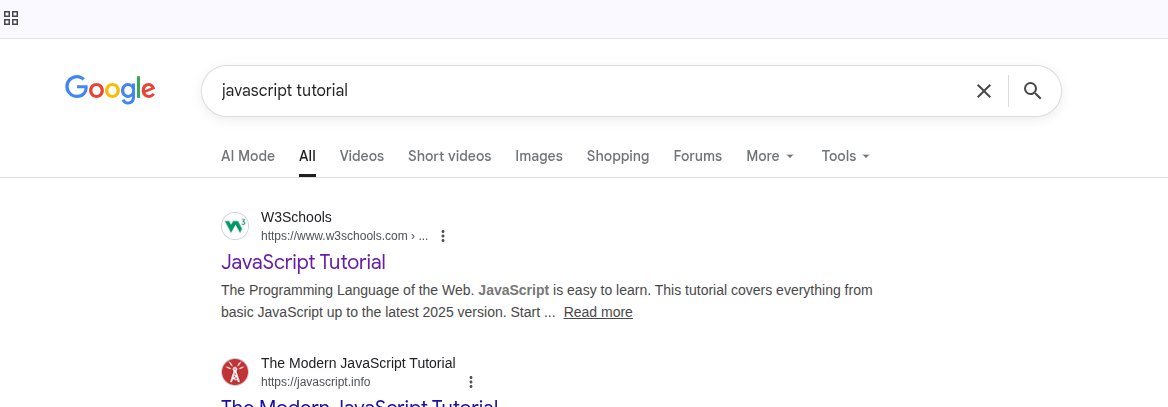
and here you see that W3schools website i guess pretty much everyone know about it it is a pretty famous website I faced it many times for even i dont know what reasons exactly but like for quick reference of some css rules etc mostly. i guess its a decent choice to start with so i will read something from this website so lets start reading this. https://www.w3schools.com/js/
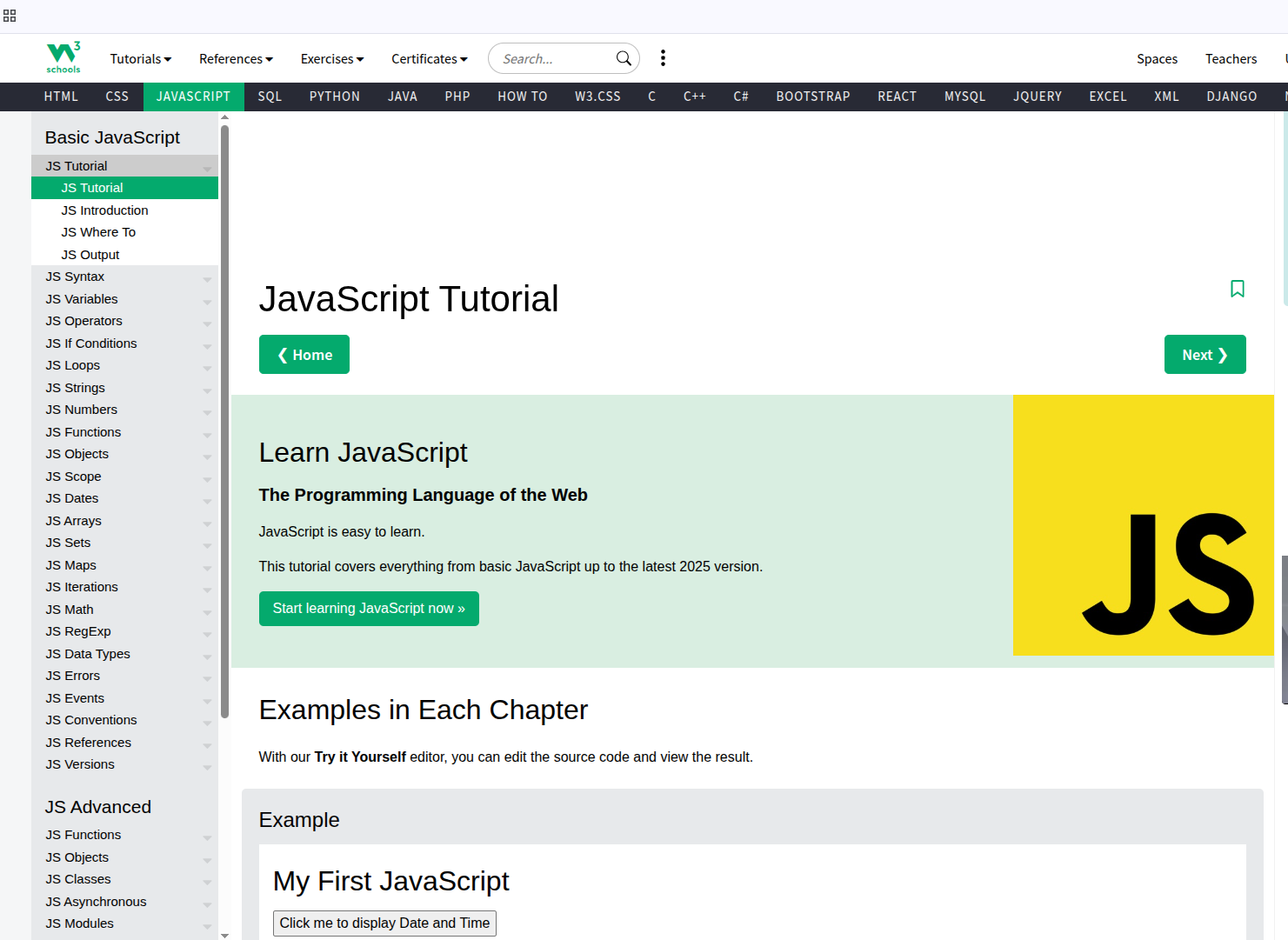
well i will start learning this page now and will write updates here.
Ohh this page have first example of java script which prints date by clicking button see in image its code and example
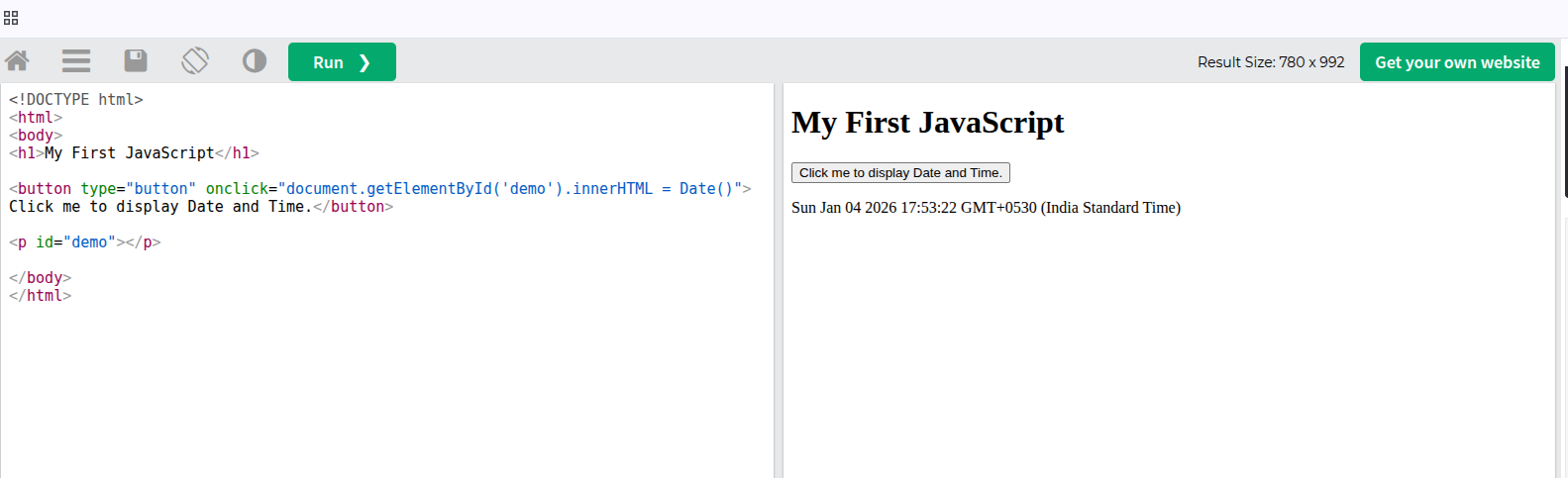
well i know java script a little so it was easy for me to understand like in this example code on left the html body have a h1 heading as in left and a button where it have onclick= to a JavaScript code or action which is looking for the element in the html body with id "demo" and replacing its inner content innerHTML with Date() function some default JavaScript function for printing dates i guess and if u see below the html code just after the button there is a <p> tag with id demo and it dont have any content inside like text or something.
so basically on clicking on the button it runs a JavaScript code which will look for element with id demo which is p tag here and it will replace its innerHTML with Date() function output which is current date as u see on right result of clicking button
so its a simple code but it is showing how javaScript is used to add functionality to your page like showing current date here and one more thing to notice here is for the html content to change with JavaScript we dont need to reload page it happens in place i guess it is how the current react etc make static pages somehow where we dont need to reload page to change content etc.
My reason for learning javaScript is also like i don want to reload page for some page action like clicking on button or performing some acition etc I am learning it to understand it better to implemen required features in my website or projects by javaScript if can as much as I can.
Its around 650 words now i did not noticed i am kind of enjoying writing but i guess I should not make one page too long so i will shift on another page and i guess i should name the title as day 1 of learning javaScript part1 or something well see u in the next page.
well i did not fee like much study so i not started part 2 so part 1 is only for day 1
tell me in comments if u wanna say something to me.
When debugging network issues on Linux, one of the most important commands is:
ip route
This command shows the routing table — the rules your system uses to decide where every network packet should go.
Let’s break down the following output in detail:
default via 192.168.1.1 dev wlp0s20f3 proto dhcp src 192.168.1.9 metric 600
192.168.1.0/24 dev wlp0s20f3 proto kernel scope link src 192.168.1.9 metric 600
No assumptions. No skipped words.
What a Routing Table Actually Is
A routing table is a list of instructions that answers one question:
“If a packet needs to go to this destination, which interface, gateway, and source IP should be used?”
Linux checks routes top-down, choosing the most specific match.
Line 1: The Default Route
default via 192.168.1.1 dev wlp0s20f3 proto dhcp src 192.168.1.9 metric 600
This line controls all traffic going outside your local network (internet traffic).
Word-by-word breakdown
- default
- Matches any destination not covered by a more specific route
- Used for internet traffic
- via
- Indicates a gateway is required
- 192.168.1.1
- The gateway IP
- Usually your Wi-Fi router
- dev
- Specifies the network interface
- wlp0s20f3
- Wireless network interface name
- (
wl= wireless, rest is hardware naming)
- proto
- Route origin
- dhcp
- Route was added automatically by DHCP
- Not manually configured
- src
- Source IP address for outgoing packets
- 192.168.1.9
- Your system’s IP address on this network
- metric
- Route priority
- Lower number = higher priority
- 600
- Priority value used when multiple routes exist
Meaning in plain English
“For any destination not in the local network, send traffic through router
192.168.1.1using Wi-Fi interfacewlp0s20f3, with source IP192.168.1.9.”
Line 2: The Local Network Route
192.168.1.0/24 dev wlp0s20f3 proto kernel scope link src 192.168.1.9 metric 600
This route handles local LAN traffic only.
Word-by-word breakdown
- 192.168.1.0/24
- Destination subnet
- Covers
192.168.1.1→192.168.1.254 /24= subnet mask255.255.255.0
- dev
- Network interface used
- wlp0s20f3
- Same Wi-Fi interface
- proto
- Route origin
- kernel
- Automatically added when interface came up
- Not from DHCP or user config
- scope
- Defines how far the route applies
- link
- Destination is directly reachable
- No gateway required
- src
- Source IP for packets in this subnet
- 192.168.1.9
- Your machine’s IP
- metric
- Route priority
- 600
- Same priority as default route
Meaning in plain English
“Any device inside
192.168.1.0/24can be reached directly through Wi-Fi without using a router.”
Why Two Routes Are Needed
Linux needs both:
| Route Type | Purpose |
|---|---|
| Local route | Talk to devices on the same LAN |
| Default route | Reach everything else (internet) |
Without the local route → LAN breaks
Without the default route → Internet breaks
How Linux Chooses Between These Routes
Example: packet going to 192.168.1.50
- Matches
192.168.1.0/24 - Uses local route
- No gateway
Example: packet going to 8.8.8.8
- No specific subnet match
- Falls back to default route
- Uses router
192.168.1.1
Final Mental Model
Think of it like this:
- Local address? → send directly
- Anything else? → send to router
- Interface decides how
- Metric decides priority
- Source IP decides identity
You open a terminal.
You type a command.
You hit Enter.
Sometimes it works instantly.
Sometimes it hangs.
Sometimes it fails with no clear reason.
That moment — when Linux is “thinking” — is networking in action.
Let’s break down what actually happens when your Linux system talks to the internet, without buzzwords or textbook noise.
Step 1: Linux Doesn’t Know Names, Only Numbers
When you type:
google.com
Linux doesn’t understand that name.
It immediately asks:
“What is the IP address for this?”
This is DNS.
Linux checks the DNS servers listed in:
/etc/resolv.conf
If DNS fails:
- Websites won’t load
- Browsers show “No internet”
- But
ping 8.8.8.8might still work
This is why DNS issues feel confusing — the network is up, but name resolution is broken.
Step 2: Routing — Deciding Where Traffic Goes
Once Linux has the IP address, it needs to decide how to reach it.
That decision is made using the routing table:
ip route
A typical entry looks like:
default via 192.168.1.1 dev eth0
This means:
“If the destination isn’t local, send it to the router.”
If this route is missing or wrong, your system knows where it wants to go — but has no path to get there.
Step 3: Network Interfaces Are the Doors
Linux sends data through interfaces, not through “the internet”.
Common ones:
eth0– Ethernetwlan0– Wi-Filo– Loopback (self communication)
You can check them with:
ip addr
If an interface is down, nothing leaves your system — even if everything else is configured perfectly.
This is why many network fixes start with:
ip link Step 4: Ports Decide Which Application Gets the Data
Your system doesn’t talk to the internet — applications do.
Ports are how Linux knows which app should receive data.
Examples:
- Web server → 80 / 443
- SSH → 22
- Database → 5432
You can see active ports using:
ss -tulnp
A common mistake:
- Service is running
- Port is open
- But it’s bound to
127.0.0.1
That means it works only locally, not from the outside world.
Step 5: Firewalls Can Block Everything Silently
Even if:
- The app is running
- The port is listening
- The route exists
Linux still asks:
“Is this traffic allowed?”
This is handled by the firewall:
iptablesnftablesufw
Firewalls don’t always say “blocked”.
They often just drop packets quietly.
That’s why networking bugs sometimes feel like ghosts.
Step 6: NAT — Why Your Private IP Works Online
Your Linux machine usually has a private IP like:
192.168.1.10
The internet never sees this.
Your router uses NAT (Network Address Translation) to:
- Replace private IPs with a public one
- Track which response belongs to which device
This is why:
- Port forwarding exists
- Containers need special rules
- Some services work internally but not externally
NAT is invisible — until it breaks.
Why Linux Networking Feels Hard (But Isn’t)
Linux networking is not one thing.
It’s a pipeline:
- DNS → name to IP
- Routing → path decision
- Interface → exit door
- Port → application
- Firewall → permission
- NAT → translation
If any one step fails, everything fails.
But once you understand this chain, debugging becomes logical — not magical.
Final Thought
Linux networking isn’t about memorizing commands.
It’s about understanding how Linux thinks:
- Where should this packet go?
- Who should receive it?
- Should it be allowed?
When you understand those questions, you stop guessing — and start fixing problems with confidence.
You open a website.
You enter your email and password.
You click Login.
And magically—you’re in.
No page refresh. No password sent again. You can reload the page, open a new tab, even close the browser and come back… still logged in.
Most people say:
“Yeah, that’s JWT.”
But what actually happens?
Let’s break it down in plain human language, step by step—no buzzwords, no fake complexity.
Step 1: You Send Your Credentials (Only Once)
When you click Login, your browser sends this to the server:
{
  "email": "[email protected]",
  "password": "secret123"
}
Important detail 👉 this is the only time your password is sent.
The server:
- Finds your user
- Verifies the password (usually via hashing)
- Decides: Yes, this user is legit
If the password is wrong → login fails
If correct → move to the next step
Step 2: The Server Creates a JWT
Instead of saving a session in memory (old-school way), the server creates a JWT (JSON Web Token).
Think of a JWT like a digitally signed ID card.
Inside the token:
- User ID
- Email / username
- Token expiry time
- Sometimes roles or permissions
Example (simplified):
{
  "user_id": 42,
  "email": "[email protected]",
  "exp": 1735689600 }
This data is:
- Encoded
- Signed (so it can’t be tampered with)
🔐 The server signs it using a secret key only it knows.
Step 3: Token Is Sent Back to Your Browser
The server responds:
{
  "access_token": "eyJhbGciOiJIUzI1NiIsInR5cCI6IkpXVCJ9..."
}
Now your browser stores this token:
- Usually in localStorage
- Or cookies (more secure if done right)
From this moment on:
👉 Your token is your identity
Step 4: Every Request Includes the Token
Now when you request anything protected:
- /profile
- /notes
- /dashboard
Your browser automatically sends:
Authorization: Bearer <JWT_TOKEN> No password.
No login again.
Just the token.
Step 5: Server Verifies the Token (Every Time)
For each request, the server:
- Checks the token signature
- Verifies it hasn’t expired
- Extracts user info
- Allows or denies access
⚠️ No database lookup is required for sessions
That’s why JWT is called stateless authentication.
Why JWT Feels So Fast
Because:
- No session storage
- No server memory tracking
- No sticky sessions needed
- Easy to scale across multiple servers
This is why JWT is popular in:
- APIs
- Microservices
- Mobile apps
- SPAs (React, Vue, etc.)
The Part People Don’t Tell You
JWT is not magic. It has trade-offs.
❌ You Can’t “Log Out” Easily
Once issued, a JWT is valid until it expires.
Logout usually means:
- Deleting token on client
- Or maintaining a token blacklist (extra complexity)
❌ Token Theft Is Dangerous
If someone steals your token:
👉 They are you
That’s why:
- HTTPS is mandatory
- Tokens should expire quickly
- Refresh tokens must be protected
Access Token vs Refresh Token (Quickly Explained)
Good systems use two tokens:
Access Token
- Short-lived (5–15 minutes)
- Used on every request
Refresh Token
- Long-lived
- Used only to get a new access token
This way:
- Even if access token leaks, damage is limited
- Users stay logged in smoothly
When JWT Is a Bad Idea
JWT is NOT ideal if:
- You need instant logout everywhere
- You want simple auth for a small app
- You don’t understand token security well
In those cases:
👉 Traditional session-based auth is safer and simpler.
The Big Picture
JWT is not about being “modern”.
It’s about who carries the authentication state.
- Sessions → server remembers you
- JWT → you carry proof of who you are
Neither is wrong.
Both are tools.
Final Thought
If you understand this flow, you already know more JWT than most developers who use it daily.
If you’ve worked with modern web or mobile applications, you’ve probably heard this debate again and again:
“Should I use REST or GraphQL?”
Blogs, YouTube videos, and Twitter threads argue endlessly — but most explanations are either too shallow or overly technical.
Let’s break it down clearly, practically, and without hype.
What Is REST (In Simple Words)?
REST (Representational State Transfer) is an API design style where:
- Each resource has a fixed endpoint
- You use HTTP methods like GET,POST,PUT,DELETE
- The server decides the response structure
Example
GET /users/1 GET /users/1/postsEach endpoint returns a predefined data shape.
Why REST Became Popular
- Easy to understand
- Simple to cache
- Works well with HTTP standards
- Supported everywhere
What Is GraphQL?
GraphQL is a query language for APIs where:
- There is usually one endpoint
- The client decides what data it wants
- The server returns exactly that
Example
{ user(id: 1) { name posts { title } } } You get only what you ask for — nothing more, nothing less.
The Core Confusion: Overfetching vs Underfetching
This is where most people get stuck.
REST Problem
You often get:
- Too much data (overfetching)
- Too little data (underfetching → more API calls)
Example:
You want only a user’s name but get email, address, preferences, settings, etc.
GraphQL Solution
- Client controls the response
- One request can fetch deeply nested data
- No wasted bandwidth
REST vs GraphQL (Quick Comparison)
| Feature | REST | GraphQL |
|---|---|---|
| Endpoints | Multiple | Usually one |
| Data Control | Server | Client |
| Overfetching | Common | Rare |
| Learning Curve | Low | Medium |
| Caching | Simple | More complex |
| Tooling | Mature | Rapidly growing |
When REST Is the Better Choice
Use REST if:
- Your API is simple
- You want easy caching
- You’re building CRUD-heavy apps
- You need fast onboarding for developers
👉 Example: Blogs, admin dashboards, internal tools
When GraphQL Shines
Use GraphQL if:
- You have multiple clients (web, mobile, IoT)
- Your data is deeply connected
- Network performance matters
- Frontend needs flexibility
Example: Social networks, large-scale SaaS apps
A Common Myth (Important)
“GraphQL will replace REST”
No. They solve different problems.
Many companies use:
- REST for public APIs
- GraphQL for internal or frontend-facing APIs
You don’t need to choose sides — choose use cases.
Final Verdict
Ask this one question before choosing:
Who should control the data shape — the server or the client?
- Server control → REST
- Client control → GraphQL
That’s it. Everything else is implementation detail.
Anime isn’t just entertainment — it’s storytelling at its peak. Whether you love intense action, emotional drama, or mind-bending plots, there’s an anime that will hook you instantly.
Below are my Top 105 picks of must-watch anime,
- Attack on Titan
Why watch: Dark, emotional, and unpredictable. A masterpiece of storytelling with deep political and moral themes. - Naruto Shippuden
Why watch: One of the best character growth arcs ever. Friendship, sacrifice, and epic fights. - One Piece
Why watch: World-building on another level. Emotional, adventurous, and endlessly rewarding. - Demon Slayer
Why watch: Stunning animation + emotional storytelling. Easy to start, hard to stop. - Dragon Ball Z
Why watch: The foundation of modern shonen anime. Pure nostalgia and iconic battles.
Most people focus on how many hours they sleep. But science says something even more important matters: waking up at the same time every day.
This one habit can quietly transform your energy, mood, focus, and even long-term health.
The Science Behind It
Your body runs on an internal clock called the circadian rhythm. When you wake up at a consistent time, this clock stays balanced. As a result:
- You fall asleep faster
- Your sleep quality improves
- Your brain feels sharper during the day
Irregular wake-up times confuse this system, leading to fatigue, brain fog, and poor concentration—even if you sleep long hours.
Why It Boosts Productivity
People who wake up at a fixed time experience:
- Better morning energy
- More stable focus
- Fewer mood swings
Your brain loves predictability. When it knows when the day starts, it performs better.
You Don’t Need to Wake Up Early
This isn’t about waking up at 5 AM. It’s about choosing a time and sticking to it—even on weekends. Consistency matters more than the clock.
The Small Habit With Big Returns
You don’t need expensive supplements, extreme routines, or complicated hacks. Just one decision made daily can improve sleep, mental clarity, and overall well-being.
Sometimes, the most powerful changes are the simplest ones.
In a world full of notifications, short videos, and endless scrolling, our attention span is shrinking fast. One simple habit is proving to be a powerful antidote: daily note-taking.
Writing notes isn’t just about remembering things — it actually trains your brain to think better.
Why Note-Taking Works
When you write something down, your brain processes information more deeply than when you just read or hear it. This improves memory, focus, and clarity. That’s why students, writers, and high performers rely on notes to organize ideas and reduce mental overload.
Notes Turn Ideas Into Action
Ever had a great idea and forgot it later? Notes capture thoughts before they disappear. Over time, your notes become a personal knowledge base — a place where small ideas grow into plans, stories, or solutions.
Digital Notes, Smarter Thinking
Modern note-taking tools allow you to:
- Organize thoughts into folders or categories
- Search ideas instantly
- Share knowledge with others
- Turn private notes into public insights
This makes writing not just personal, but powerful.
The Real Secret
You don’t need long essays or perfect words. Even rough notes written daily can improve thinking, creativity, and productivity. Five minutes a day is enough to see results.
If you want a sharper mind and a calmer head, start writing — one note at a time.
Most people think writing is for authors, poets, or someone with a big story to tell. But the truth is—writing is for anyone who feels too much, thinks too deeply, or simply doesn’t want to forget who they are becoming.
When you write things down, something strange and beautiful happens. Your thoughts slow down. Your chaos gets a shape. What felt heavy in your head suddenly feels lighter on the page.
You don’t need perfect words. You don’t need grammar or a plan. Some of the best writing starts as rough notes, half-finished thoughts, or sentences that don’t make sense yet. That’s where honesty lives.
Writing is a quiet conversation with yourself. It helps you remember ideas, heal emotions, and sometimes discover answers you didn’t know you were looking for. And when you choose to share it, your words might help someone else feel less alone.
So write—without pressure. Write to remember, to heal, to imagine, or just to breathe a little better.
Your words matter, even if no one else sees them. And sometimes, especially then.
Cricket Fans Flood Google as ENG vs AUS and Domestic Clashes Trend Big
Cricket is once again dominating the internet, with Google Trends showing a sharp surge in searches related to both international blockbusters and Indian domestic clashes. From the ever-intense England vs Australia showdown to domestic contests like Delhi vs Gujarat, fans are actively searching for live scores, playing XIs, venues, and match updates.
The sudden spike clearly shows one thing:
👉 when cricket heats up, fans rush to Google first.
Let’s break down why these cricket topics are trending and what’s driving the massive online interest.
🔥 ENG vs AUS: The Rivalry That Never Sleeps
Few rivalries in world sport match the intensity of England vs Australia. Whether it’s a high-stakes Test match, a fast-paced ODI, or a thrilling T20 encounter, clashes between these two cricketing giants always command global attention.
This rivalry isn’t just about cricket — it’s about history, pride, and legacy.
Why ENG vs AUS Is Trending Right Now
- Ongoing or recently announced international series
- Fans searching for ENG vs AUS live score and highlights
- Curiosity around new players, debuts, and squad changes
- The Ashes-like rivalry factor, even outside Test cricket
- Heavy discussion across social media and sports platforms
Search interest for “eng vs aus” has hit Breakout status on Google Trends — meaning searches have increased exponentially in a very short time. This usually happens only when a match delivers high drama, big moments, or major news.
🇮🇳 Delhi vs Gujarat: Domestic Cricket Stealing the Spotlight
International cricket isn’t the only thing grabbing attention. Indian fans are also closely following domestic tournaments, especially the Vijay Hazare Trophy.
The Delhi vs Gujarat match has emerged as a major talking point, with fans actively tracking:
- Delhi vs Gujarat live score
- Match venue and pitch report
- Playing XI and key performers
- Rising domestic talents and future India prospects
With selectors keeping a close eye on domestic performances, fans now treat these matches as crucial pathways to Team India — making domestic cricket more relevant than ever.
🌟 Players Driving Search Surges
Alongside matches, individual players are also trending heavily. Names like Jhye Richardson, Josh Tongue, Michael Neser, and Harsh Tyagi are seeing breakout interest.
These spikes often happen due to:
- Match-winning performances
- National team selection or comeback news
- Injury updates
- Strong domestic or international form
For fans, player searches mean curiosity, hope, and debate — especially when future stars are in action.
📈 What These Trends Tell Us About Cricket Fans
The current Google Trends data highlights some clear patterns:
- Fans want real-time updates, not delayed news
- Domestic cricket now enjoys mainstream attention
- Viewers are deeply interested in squads, venues, and player stats
- Breakout trends usually signal viral cricket moments
In short, cricket consumption has become instant, digital, and highly interactive.
🏏 Final Thoughts
From iconic international rivalries like ENG vs AUS to competitive domestic clashes such as Delhi vs Gujarat, cricket continues to dominate fan attention both on and off the field.
The latest Google Trends surge proves one thing clearly:
If there’s cricket happening anywhere, fans are already searching for it.
With more matches, knockouts, and standout performances coming up, expect these cricket trends to rise even further in the days ahead.


Genshin Impact isn’t just about grinding characters or pulling on banners — it’s about getting lost in a world that actually wants you to explore it.

You climb a mountain just because it’s there…
Only to find a chest, a puzzle, a quiet piano melody, and suddenly 30 minutes are gone.
The combat feels simple at first — then elemental reactions click. Fire meets water. Ice locks enemies in place. Dendro changes how you think about the battlefield. It’s less button-mashing, more chemistry experiment with swords ⚡🔥❄️🌿
What really hits though?
The music and atmosphere. Each region feels alive:
- Windy freedom
- Contract-bound stone cities
- Thunder-filled isolation
- Dreamlike forests
- Nations shaped by gods, loss, and ideals
And the characters?
They don’t feel like stat sheets. They feel like people with regrets, jokes, trauma, and loyalty — wrapped in anime art and elemental powers.
You log in for dailies.
You stay for the sunsets, lore drops, and that one quest that unexpectedly hurts.
Genshin Impact proves one thing clearly:
🎮 A free-to-play game can still have soul.
Have you ever logged in “just for 10 minutes” and stayed for hours? 😌